|
CGI Database Browser - Felix John COLIBRI. |
- abstract : a CGI extension enabling display, update, insert and computation on a database Table using a Web Browser
- key words : CGI extension, database, browser, CGI controls, CGI FORM
- software used : Windows XP, Delphi 6, IE Browser
- hardware used : Pentium 1.400Mhz, 256 M memory, 140 G hard disc
- scope : Delphi 1 to 8 for Windows, Kylix
- level : Delphi developer
- plan :
1 - Introduction We will use our cgi web server to develop a Web Database Browser: the user
displays Table rows, and moves backward or forward in a Table using the mouse.
2 - CGI database handling 2.1 - Static Table display
The PC where our Server resides contains a Table. We could build an .HTML page displaying the rows of this Table in .HTML format, and if a remote Clients specifies the URL of this page in his Browser address edit, he would see the
table content. However if other users modifiy the Table content, or if the Client choses to display rows by groups of 10 or 20 rows, the construction of a static .HTML page is no longer valid. We must use pages which are dynamically build.
2.2 - Dynamic Table display Using Server extensions, like CGI, WinCGI, Isapi or ASP, we can run a piece of code which will build an .HTML page corresponding to the rows requested by the Client.
To start the dialog, we build a static page containing a CGI <FORM>, allowing the Client to start fetching the first group. When the Client sends back this
page to the Server, the Server extension creates a new page with the requested rows as well as CGI <FORM> controls allowing the Client to request the next groups.
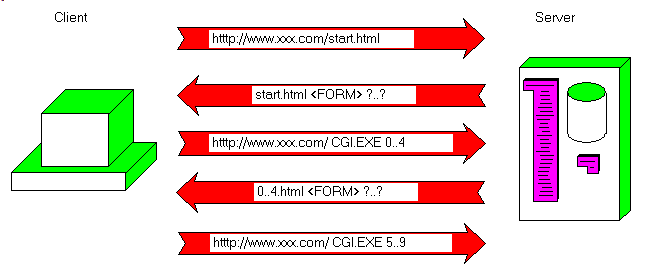
This kind of dialog can be outlined with the following figure:
2.3 - State maintenance Fetching the first 5 rows is easy. But how does the Client requests the 5 next
rows ? The Server does not keep any permanent data concerning each Client. The classic way of operation is a per request job: - the Server waits for Clients using a server socket
- when a Clients request comes in, the server socket spins off a server client socket, dedicated to the handling of this very Client. Communication flows between the client socket and this server client socket. Once the
conversation is ended, the server client socket closes and is usually destroyed
For a static HTML page request for instance  |
the IE Browser (or Netscape or any other) sends the URL
|  | the IIS Server (or Apache etc) load the requested page from disk, and
sends it over to the Client. Once the page is sent to the Client, the Server closes the server client socket
| This may take many packet exchange (the usual maximum packet size is around
1.500 bytes), but the management of the transfer (what has been sent, what is still waiting) is handled by the WinSock library and the Server (IIS). To
send a 1 Meg page, the Server can use Socket.Send, or split the the calls in smaller chunks. But in any case, we as programmer have little control over this. We cannot insert a Table current position in this job.
Could we tailor a CGI Executable, which would stay in memory and handle this current position ? No because the the CGI Executable is loaded on a per request basis:
- the Client sends a request containing a <FORM> tag with a specific CGI Executable file name
- on the Server side:
- the Server spins off the server client socket
- this socket extracts the CGI executable file name, loads and runs this executable
- this executable builds an .HTML answer. Usually, there is no communication with the Client from the CGI executable. When the page
is complete, is is sent to the Server and the CGI Executable unloaded from memory.
- the Server sends the page to the Client, and usually closes the server client socket.
- the Client Browser displays this page
- if the Client sends another request, even if the CGI Executable is the same, it will be loaded and created from scratch
The CGI Executable could save some state on disk. But this would require Client identification. And if many Clients are handled at the same time, we run into a scaling problem. In a similar way, an IsApi DLL could keep some
Client state in memory, or disk, but this is not considered good practice because it does not scale up well. In conclusion, the Server is, our should be kept, essentially "stateless".
Can we maintain state from the Client side ? There are two possibilities: - IE can handle cookies, which are small binary files managed by the HTTP protocol. This file contains anything (text, binary data, even executable
code), and are managed somehow behind the Client's back, which is why many people dislike them. For more information about cookies, please read this cookie specification.
- we can include in .HTML pages some scripts (VB Script, Java Script, ActiveX etc), which could save state on disk between page requests.
The other possibility is to include state information in each page which
travels back and forth between the Server and the Client, like a hot potato. This is exactly what we represented in the figure above: | |
the Client requests the first group
| | | the Server sends an .HTTP answer with the .HTML page and the row references (0..4)
|
| | the Browser displays the page, and when the user clicks "next", an HTTP request is sent back to the Server with this 0..4 information
|
| | the Server reads the position in the request, builds a page with rows 5..9 AND sends this 5..9 state information back to the Client
|
There are two ways to include state in .HTTP requests: - within the POST request (fat URLs):
<HTML>
<BODY>
<FORM METHOD="POST"
ACTION="http://127.0.0.1/scripts/browse.exe?first=0&last=4"><BR>
<!-- here the rows -->
<INPUT TYPE="submit" VALUE="Send">
</FORM><BR>
</BODY>
</HTML>
|
- within HIDDEN tags
<HTML>
<BODY>
<FORM METHOD="POST"
ACTION="http://127.0.0.1/scripts/browse.exe"><BR>
<!-- here the rows -->
<INPUT TYPE="HIDDEN" NAME="first_row" VALUE="0">
<INPUT TYPE="HIDDEN" NAME="last_row" VALUE="4">
<INPUT TYPE="submit" VALUE="Send">
</FORM><BR>
</BODY>
</HTML>
|
In our code, we will use the last method, with HIDDEN tags.
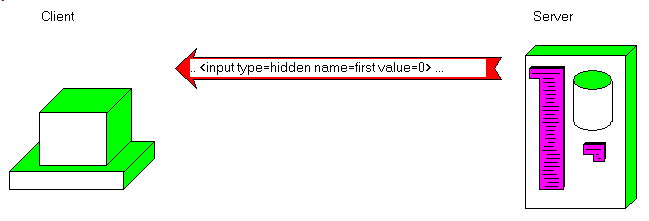
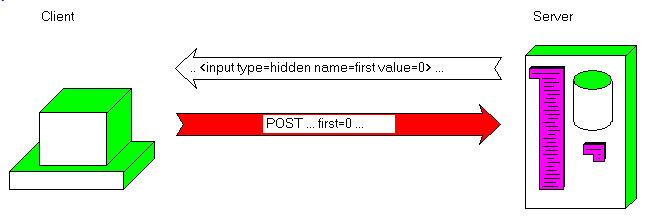
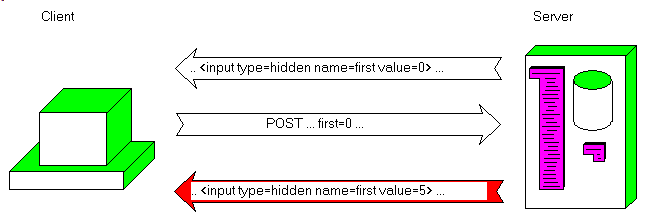
2.4 - HIDDEN tag communication The information exchange works like this:
So basically - the CGI Executable places values in the HIDDEN tags
- the Client reads those values and sends them back untouched
- the new CGI Execution will read the values that the previous executable included, uses those values, and sends new values
2.5 - What state Information As shown above, hiddden tags are very easy to use. We can create any number of them, and include any kind of string information in the attached VALUE attribute.
So the type of state information depends of the kind of CGI Executable processing we have in mind: - if the Client is supposed to type the name of a Table in a Cgi Edit, then
the CGI Executable must be able to open whatever Table was specified by the Client. So TableName must be included in the hidden tags.
- if the client can specify some ordering, then IndexName, IndexFieldNames or ORDER BY clause value has to be included
- if the Client wants some row filtering, or some column projection, then the
corresponding information must be encoded in the hidden fields
2.6 - When and What does the <FORM> submits ? When a Client clicks "submit", the Browser sends the CGI parameters back to
the Server. Let's recap the kind of information that is sent: - CGI buttons: this control looks like a Windows tButton, and attributes are:
- NAME: specifies the key sent back to the Server
- VALUE: specifies the text displayed, as well as the value sent back to the Server
- ALIGN: specifies text alignment
- TABINDEX allow Tabulation key order specification (like in Delphi)
The Window will display a rectangular button. The user can - move around using the Tabulation key (in Internet Explorer, focus will shift between the <FORM> control and the address bar), and a dotted
rectangle will highlighte the focus
- when the user click on the button with the mouse, or hits Enter when the button has the dotted focus rectangle, the answer whith the name=value parameter string will be sent to the Server
Note that: - if no NAME attribute is specified, no key=value will be sent (a parameter string with other <FORM> control parameters will be sent, or an empty parameter string if no other control is present)
Here is an example:
<HTML>
<HEAD>
</HEAD>
<BODY>
<H2><CENTER>CGI buttons</CENTER></H2>
<FORM method="POST"
ACTION="http://127.0.0.1/scripts/cgi_trial.exe">
<INPUT TYPE="submit" NAME="one"
VALUE="11"><BR>
<INPUT TYPE="submit" NAME="two"
VALUE="3=&+<>.'[3"><BR>
<INPUT TYPE="submit" NAME="three"
VALUE="3 3 3"><BR>
</FORM>
</BODY>
</HTML>
|
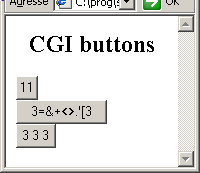 | | | When we hit the "11" button, this is what will be sent to the Server:
POST /scripts/cgi_trial.exe HTTP/1.1
Accept: image/gif, image/x-xbitmap, image/jpeg, image/pjpeg, */*
Accept-Language: fr
Content-Type: application/x-www-form-urlencoded
Accept-Encoding: gzip, deflate
User-Agent: Mozilla/4.0 (compatible; MSIE 6.0; Windows NT 5.1)
Host: 127.0.0.1
Content-Length: 6
Connection: Keep-Alive
Cache-Control: no-cache
one=11 | The important parts being the first line (containing the POST method and the CGI Executable name) and the last part ("one=11") which is the parameter string
When we hit the second button, the header is similar (Content-Length changes), but the parameter string will be:
two=3%3D%26%2B%3C%3E.%27%5B3 | where the punctuations like < = . which are also used in the tag syntax have been "URL encoded", which means that the ASCII code has been sent with a % prefix.
And for the third button, the parameter string is:
where the spaces were changed into + characters. - Here is a <FORM> whith some check boxes:
<HTML>
<HEAD>
</HEAD>
<BODY>
<H2>CGI check box</H2>
<FORM method="POST"
ACTION="http://127.0.0.1/scripts/cgi_trial.exe">
<INPUT TYPE="checkbox" NAME="one"
VALUE="11"> first<BR>
<INPUT TYPE="checkbox" NAME="two">
second<BR>
third <INPUT TYPE="checkbox" NAME="three"
CHECKED><BR>
<INPUT TYPE="submit" NAME="click"
VALUE="Send">
</FORM><BR>
</BODY>
</HTML>
|
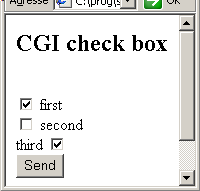 | | | Here is an example of the parameter string:
one=11&three=on&click=Send | Note that:
- the VALUE attribute is optional. If none is present and the checkbox is checked, key=on will be used in the parameter string
- the caption is NOT the VALUE string, but whatever string is present near the checkbox in the .HTML text
- it is possible to specify CHECKED to set the initial check (like in Delphi)
- we MUST include a Button (or an Edit) to trigger the sending of the <FORM>, since checking a checkbox or hitting Enter alone do not trigger
the emission of the parameter string
- Radio Buttons are similar, with the Browser handling the exclusivity property.
<HTML>
<HEAD>
</HEAD>
<BODY>
<H2>CGI<BR>
radio button</H2>
<FORM method="POST"
ACTION="http://127.0.0.1/scripts/cgi_trial.exe">
<INPUT TYPE="radio" NAME="group1"
VALUE="aaa">apple<BR>
<INPUT TYPE="radio" NAME="group1"
VALUE="bbb">orange
<HR>
<INPUT TYPE="radio" NAME="group2"
VALUE="11">blue<BR>
<INPUT TYPE="radio" NAME="group2"
VALUE="22" CHECKED>green<BR>
<INPUT TYPE="submit" NAME="click"
VALUE="Send"><BR>
</FORM><BR>
</BODY>
</HTML>
|
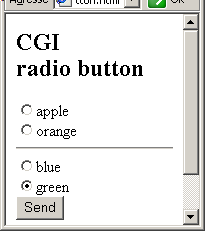 | | | and here is an example of parameter string:
group1=aaa&group2=22&click=Send | Note that:
- the grouping of the buttons is performed according to the value of the NAME attribute (our horizontal ruler is for display purposes only)
- the VALUE values must be distinct within a same group, since this is what
will be sent back to the Server
- the CHECKED attribute can specify an initial default check
- Edit controls behave nearly like Windows controls:
<HTML>
<HEAD>
</HEAD>
<BODY>
<H2>CGI edit</H2>
<FORM method="POST"
ACTION="http://127.0.0.1/scripts/cgi_trial.exe">
<INPUT TYPE="text" NAME="price"><BR>
qty: <INPUT TYPE="text" NAME="quantity"
SIZE="5"><BR>
<INPUT TYPE="text" NAME="code"
MAXLENGTH="3"><BR>
<INPUT TYPE="text" NAME="date"
VALUE="2005/5/5"><BR>
<INPUT TYPE="submit" NAME="click"
VALUE="Send">
</FORM>
</BODY>
</HTML>
| 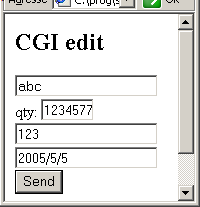 | | |
and here is an example of parameter string:
price=abc&quantity=1234567&code=123&date=2005%2F5%2F5&click=Send
| You will notice that - there is not type checking (we can type abc in an edit supposed to contain a numeric value)
- SIZE sets the edit width, but this does not correspond to a character
length (since the font is not usually of fixed pitch) and the user may enter more characters than SIZE specifies
- MAXLENGTH does not allow the user to type more than the specified value
- VALUE enables the Server to set initial values
- any caption or label is entered a standard HTML (not part of the tag)
- hitting Enter while the focus is in an Edit will send the parameter
string to the Server (but without the key=value from any Button, since no Button was clicked)
- Memo Control: if we want to send several lines, we use the TEXTAREA tag:
<HTML>
<HEAD>
</HEAD>
<BODY>
<H2>CGI Memo</H2>
<FORM method="POST"
ACTION="http://127.0.0.1/scripts/cgi_trial.exe">
<TEXTAREA NAME="info_o"
COLS="3" ROWS="2"
WRAP="off"></TEXTAREA><BR>
<TEXTAREA NAME="info_v"
COLS="3" ROWS="2"
WRAP="virtual"></TEXTAREA><BR>
<TEXTAREA NAME="info_p"
COLS="3" ROWS="2"
WRAP="physical"></TEXTAREA><BR>
<INPUT TYPE="submit" NAME="click"
VALUE="Send">
</FORM>
</BODY>
</HTML>
| 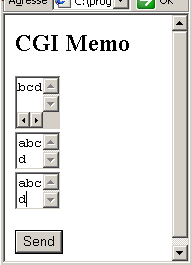 | | |
and here is an example of parameter string:
info_o=&info_v=abcd&info_p=abc%0D%0Ad&click=Send |
And - the control is not defined with a INPUT tag and a TYPE attribute, but a TEXTAREA tag. Strange, but that's the way it is.
- ROWS and COLS specify the size of the control. The control uses fixed
pitch, so this is also the character by line. However the text can contain more lines than ROWS, since scrolling is possible
- WRAP controls line breaks:
- OFF will place text with no linebreak in the parameter string
- VIRTUAL inserts line breaks for the display, but the parameter string does not contain automatically inserted line breaks
- PHYSICAL inserts line breaks for the display, and those are also included in the parameter string
Line breaks added automatically, or when the user hits Enter, are URL encoded (%0D%0A)
- image:
<HTML>
<HEAD>
</HEAD>
<BODY>
<H2>CGI image</H2>
<FORM method="POST"
ACTION="http://127.0.0.1/scripts/cgi_trial.exe">
<INPUT TYPE="image" NAME="pascal"
SRC="pascal_3.png"><BR><BR>
<INPUT TYPE="submit" NAME="click"
VALUE="Send">
</FORM><BR>
</BODY>
</HTML>
|
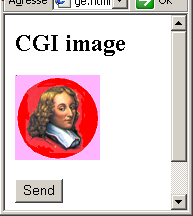 | | | and here is an example of parameter string:
And - SRC specifies the image's URL
- WIDTH, HEIGHT, VSPACE, HSPACE secify positioning and borders
- the parameter string contains the (x, y) position of the mouse click
- listbox:
<HTML>
<HEAD>
</HEAD>
<BODY>
<H2><CENTER>CGI ListBox</CENTER></H2>
<FORM method="POST"
ACTION="http://127.0.0.1/scripts/cgi_trial.exe">
<SELECT NAME="courses"><BR>
<OPTION VALUE="uml">UML
</OPTION><BR>
<OPTION VALUE="sql">Sql
</OPTION><BR>
</SELECT><BR>
<SELECT NAME="training"
SIZE="2" MULTIPLE><BR>
<OPTION VALUE="db">Database<BR>
<OPTION VALUE="oo"
SELECTED>OOAD<BR>
<OPTION VALUE="delphi">Delphi<BR>
</SELECT><BR><BR>
<INPUT TYPE="submit" NAME="click"
VALUE="Send">
</FORM>
</BODY>
</HTML>
| 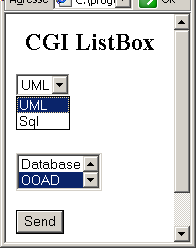 | |
| and here is an example of parameter string:
courses=uml&training=oo&click=Send |
And - <SELECT> and </SELECT> delimit the listbox items. This tag can contain:
- SIZE attributes (the control is a tListBox). If none is present, the
control behaves like a combo box (drop down)
- MULTIPLE allows multiple selection
- <OPTION> (with optional </OPTION>) contains the items. In addition
- SELECTED specifies a default selection
- the reset Button allows to redisplay the default values
<HTML>
<HEAD>
</HEAD>
<BODY>
<H2>CGI reset</H2>
<FORM method="POST"
ACTION="http://127.0.0.1/scripts/cgi_trial.exe">
<INPUT TYPE="text" NAME="price">
<INPUT TYPE="reset" NAME="init"
VALUE="Reset">
<INPUT TYPE="submit" NAME="click"
VALUE="Send">
</FORM>
</BODY>
</HTML>
| 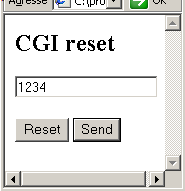 | | |
Nothing is sent to the Server when clicking a "reset" button - and finally the HIDDEN tag:
<HTML>
<HEAD>
</HEAD>
<BODY>
<H2>CGI hidden</H2>
<FORM method="POST"
ACTION="http://127.0.0.1/scripts/cgi_trial.exe">
<INPUT TYPE="text" NAME="price"><BR>
<INPUT TYPE="hidden" NAME="amount"
VALUE="333"><BR>
<INPUT TYPE="submit" NAME="click"
VALUE="Send">
</FORM>
</BODY>
</HTML>
| 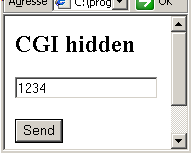 | |
| and here is an example of parameter string:
price=1234&amount=333&click=Send |
And - the hidden field is not display (of course)
- we can include as many of those hidden fields as we want
- as already explained, there is no computation on the Client side: the
Server sends the 333 value, this is included (but not displayed) in the browser, and sent back when the user clicks "Send". Its only purpose is to maintain state between successive CGI Executable runs
All the examples were analyzed using our CGI web server
2.7 - Entering a new Row In order to enter a new row, we simply build an .HTML page with Edits for
input. We can display the Edits in several ways: - in a page dedicated to the input of the new row
- at the bottom of a grid-like display of previous rows
We also must pay special attention to partial entries, since each Enter key
will send the (possibly incomplete values) to the Server. The best way is to reject any entries with empty keys, and when the key field is present, either append the new row with whatever values were sent, or update the values of the
row with this key value.
2.8 - Modifying a Row Modification of a row can be handled in the same way as new row insertions: we use Edit controls.
2.9 - Handling Several Rows
Yet another problem is to perform some computations based on several rows. We could for instance display the total of a column. If we do not use any Client side scripting (Java Script, VB Script, ActiveX),
there is nothing that can be computed by the Browser. If some totals have to be computed, they will come from the Server: when we send the modifications, the Server sends an page with an updated total back.
3 - The Delphi CGI Executables
3.1 - simple Table Browser In this first example, we simply display groups of rows of a Table, and can navigate forward and backward using Button controls.
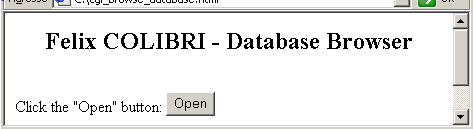
Here are the details: - the start page looks like this:
- the .HTML text is the following:
<HTML>
<HEAD>
</HEAD>
<BODY>
<H2><CENTER>Felix COLIBRI - Database Browser</CENTER></H2>
<FORM method="POST"
ACTION="http://127.0.0.1/scripts/cgi_database_browser.exe">
Click the "Open" button: <INPUT TYPE="submit" VALUE="Open">
</FORM>
</BODY>
</HTML>
|
- the CGI Executable, cgi_database_browser.exe, uses the following main method:
procedure evaluate_request(p_c_key_value_list: tStringList;
p_c_html_base_page_builder: c_html_base_page_builder);
var l_key, l_next, l_forward, l_backward: String;
l_c_table: tTable;
l_locate_result: Boolean;
l_line_count: Integer;
l_column: Integer;
l_foward_direction: Boolean;
begin
with p_c_key_value_list do
begin
l_key:= Values['key'];
l_next:= Values['next'];
l_forward:= Values['forward'];
l_backward:= Values['backward'];
l_foward_direction:= (l_forward= '>');
end; // with p_c_key_value_list
with p_c_html_base_page_builder do
begin
build_page_start;
build_line('<H2><CENTER>Felix COLIBRI - Database Browser</CENTER></H2>');
l_c_table:= tTable.Create(Nil);
with l_c_table do
begin
DatabaseName:= 'dbdemos';
TableName:= 'Animals.dbf';
IndexName:= 'Name';
Open;
if l_key<> ''
then begin
l_locate_result:= Locate('Name', l_key, [loPartialKey]);
if l_locate_result
then begin
l_next:= '2';
build_line('key='+ l_key+ ', next='+ l_next);
if not l_foward_direction
then l_next:= '-'+ l_next;
build_line('MoveBy '+ l_next);
MoveBy(StrToInt(l_next));
end
else build_line('key='+ l_key+ ' not_found, next= '+ l_next);
write_log(f_display_TF(l_locate_result));
end
else build_line('no_key, next= '+ l_next);
build_line(', first '+ Fields[0].AsString);
// -- send back the first row's key
build_line('<FORM method="POST"');
build_line('ACTION="http://127.0.0.1/scripts/cgi_database_browser.exe">');
build_line('<INPUT TYPE="submit" NAME=backward VALUE="<">');
build_line('<INPUT TYPE="submit" NAME=forward VALUE=">">');
build_line('<INPUT TYPE=HIDDEN NAME="key" VALUE="'
+ Fields[0].AsString+ '">');
build_line('</FORM>');
build_line( '<TABLE border=1 cellspacing=0 cellpadding=1>');
l_line_count:= 0;
while not Eof and (l_line_count< 5) do
begin
build_line( '<TR>');
for l_column:= 0 to 3 do // Table1.Fields.Count- 1 do
begin
if l_column in [1, 2]
then build_line( '<TD align=right>')
else build_line( '<TD>');
build_line(Fields[l_column].AsString);
build_line( '</TD>');
end;
build_line( '</TR>');
Next;
Inc(l_line_count);
end; // while not Eof
Close;
Free;
end; // with l_c_table
build_page_end;
end;
end; // evaluate_request
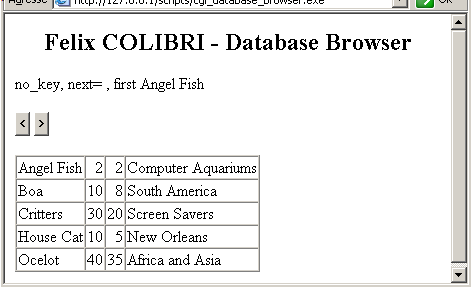
| - when the user clicks the "open" button, the Server sends back the following page:
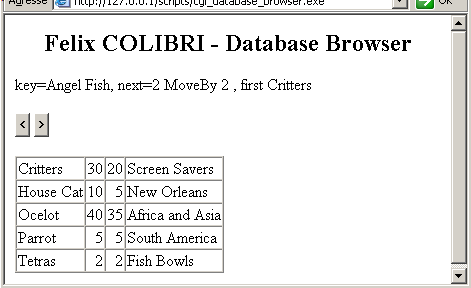
- and when the user clicks the ">" button, the next group is sent:
If we analyze the TCP / IP packets exchanged, here is the detail: | | the user starts the IE Browser, enters the address and hits Enter. The
request is sent to the Server. This is the packet received by the Server:
132 < POST /scripts/cgi_database_browser.exe HTTP/1.1
132 < Accept: image/gif, image/x-xbitmap, image/jpeg, image/pjpeg, */*
132 < Accept-Language: fr
132 < Content-Type: application/x-www-form-urlencoded
132 < Accept-Encoding: gzip, deflate
132 < User-Agent: Mozilla/4.0 (compatible; MSIE 6.0; Windows NT 5.1)
132 < Host: 127.0.0.1
132 < Content-Length: 0
132 < Connection: Keep-Alive
132 < Cache-Control: no-cache
132 < | | | | the Server sends the first page back:
132 > HTTP/1.1 200 OK
132 > Server: my_server
132 > Content-type: text/html
132 > Content-Length=1237
132 >
132 > <HTML>
132 > <HEAD>
132 > </HEAD>
132 > <BODY>
132 > <H2><CENTER>Felix COLIBRI - Database Browser</CENTER></H2>
132 > no_key, next=, first Angel Fish
132 > <FORM method="POST"
132 > ACTION="http://127.0.0.1/scripts/cgi_database_browser.exe">
132 > <INPUT TYPE="submit" NAME=backward VALUE="<">
132 > <INPUT TYPE="submit" NAME=forward VALUE=">">
132 > <INPUT TYPE=HIDDEN NAME="key" VALUE="Angel Fish">
132 > </FORM>
132 > <TABLE border=1 cellspacing=0 cellpadding=1>
132 > <TR>
132 > <TD>Angel Fish</TD>
132 > <TD align=right>2</TD>
132 > <TD align=right>2</TD>
132 > <TD>Computer Aquariums</TD>
132 > </TR>
132 > <TR>
132 > <TD>Boa</TD>
132 > <TD align=right>10</TD>
132 > <TD align=right>8</TD>
132 > <TD>South America</TD>
132 > </TR>
132 > <TR>
132 > <TD>Critters</TD>
132 > <TD align=right>30</TD>
132 > <TD align=right>20</TD>
132 > <TD>Screen Savers</TD>
132 > </TR>
132 > <TR>
132 > <TD>House Cat</TD>
132 > <TD align=right>10</TD>
132 > <TD align=right>5</TD>
132 > <TD>New Orleans</TD>
132 > </TR>
132 > <TR>
132 > <TD>Ocelot</TD>
132 > <TD align=right>40</TD>
132 > <TD align=right>35</TD>
132 > <TD>Africa and Asia</TD>
132 > </TR>
132 > </TABLE>
132 > </BODY>
132 > </HTML> | | | |
the user clicks the ">" button. This is what the Server receives: 124 < POST /scripts/cgi_database_browser.exe HTTP/1.1
124 < Accept: image/gif, image/x-xbitmap, image/jpeg, image/pjpeg, */*
124 < Referer: http://127.0.0.1/scripts/cgi_database_browser.exe
124 < Accept-Language: fr
124 < Content-Type: application/x-www-form-urlencoded
124 < Accept-Encoding: gzip, deflate
124 < User-Agent: Mozilla/4.0 (compatible; MSIE 6.0; Windows NT 5.1)
124 < Host: 127.0.0.1
124 < Content-Length: 26
124 < Connection: Keep-Alive
124 < Cache-Control: no-cache
124 <
124 < forward=%3E&key=Angel+Fish | Note that - the Server used a new server client socket to manage the new request (the handle is 124 and no longer 132)
| | | the Server sends the second group:
124 > HTTP/1.1 200 OK
124 > Server: my_server
124 > Content-type: text/html
124 > Content-Length=1241
124 >
124 > <HTML>
124 > <HEAD>
124 > </HEAD>
124 > <BODY>
124 > <H2><CENTER>Felix COLIBRI - Database Browser</CENTER></H2>
124 > key=Angel Fish, next=2, MoveBy 2, first Critters
124 > <FORM method="POST"
124 > ACTION="http://127.0.0.1/scripts/cgi_database_browser.exe">
124 > <INPUT TYPE="submit" NAME=backward VALUE="<">
124 > <INPUT TYPE="submit" NAME=forward VALUE=">">
124 > <INPUT TYPE=HIDDEN NAME="key" VALUE="Critters">
124 > </FORM>
124 > <TABLE border=1 cellspacing=0 cellpadding=1>
124 > <TR>
124 > <TD>Critters</TD>
124 > <TD align=right>30</TD>
124 > <TD align=right>20</TD>
124 > <TD>Screen Savers</TD>
124 > </TR>
124 > <TR>
124 > <TD>House Cat</TD>
124 > <TD align=right>10</TD>
124 > <TD align=right>5</TD>
124 > <TD>New Orleans</TD>
124 > </TR>
124 > <TR>
124 > <TD>Ocelot</TD>
124 > <TD align=right>40</TD>
124 > <TD align=right>35</TD>
124 > <TD>Africa and Asia</TD>
124 > </TR>
124 > <TR>
124 > <TD>Parrot</TD>
124 > <TD align=right>5</TD>
124 > <TD align=right>5</TD>
124 > <TD>South America</TD>
124 > </TR>
124 > <TR>
124 > <TD>Tetras</TD>
124 > <TD align=right>2</TD>
124 > <TD align=right>2</TD>
124 > <TD>Fish Bowls</TD>
124 > </TR>
124 > </TABLE>
124 > </BODY>
124 > </HTML> |
|
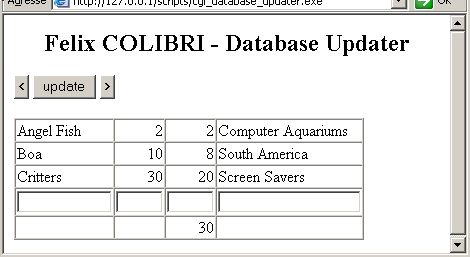
3.2 - Adding New Values We have developed a second CGI Executable which - displays a row of Edits, for adding or modifying row values
- shows the cumulative SIZE value
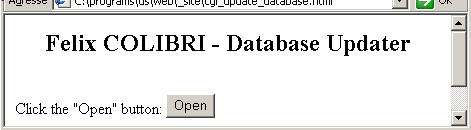
The starting .HTML page simply calls this executable:
Clicking "Open" returns the following page:
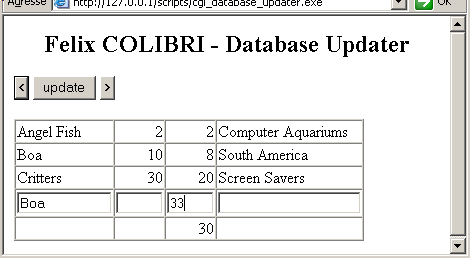
We can change the value of the Boa Size:
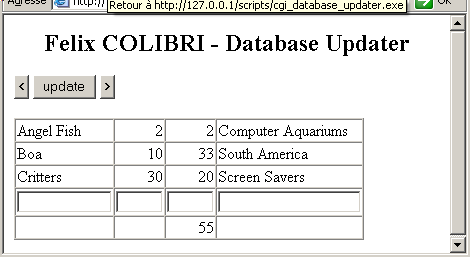
and hitting "updtate" will return the rows with the new value:
Here is the main procedure of the CGI Executable:
procedure evaluate_request(p_c_key_value_list: tStringList;
p_c_html_base_page_builder: c_html_base_page_builder);
var l_key, l_next, l_forward, l_backward: String;
l_c_table: tTable;
l_locate_result: Boolean;
l_line_count: Integer;
l_column: Integer;
l_froward_direction: Boolean;
l_the_cell: String;
l_size: String;
l_total: Integer;
l_field_0, l_field_1, l_field_2, l_field_3: String;
begin
with p_c_key_value_list do
begin
l_key:= Values['key'];
l_next:= Values['next'];
l_forward:= Values['forward'];
l_backward:= Values['backward'];
l_field_0:= Values['field_0'];
l_field_1:= Values['field_1'];
l_field_2:= Values['field_2'];
l_field_3:= Values['field_3'];
end; // with p_c_key_value_list
l_froward_direction:= (l_forward= '>');
with p_c_html_base_page_builder do
begin
build_page_start;
build_line(' <H2><CENTER>Felix COLIBRI - Database Updater</CENTER></H2>');
// -- add moving buttons
l_c_table:= tTable.Create(Nil);
with l_c_table do
begin
DatabaseName:= '..\_site\database\';
TableName:= 'Animals.dbf';
IndexName:= 'Name';
Open;
if l_field_0<> ''
then begin
write_log('l_field_0 '+ l_field_0);
l_locate_result:= Locate('Name', l_field_0, []);
if l_locate_result
then begin
// -- update record
Edit;
if l_field_1<> ''
then Fields[1].AsString:= l_field_1;
if l_field_2<> ''
then Fields[2].AsString:= l_field_2;
if l_field_3<> ''
then Fields[3].AsString:= l_field_3;
Post;
end
else begin
// -- create new record
AppendRecord([l_field_0, l_field_1, l_field_2, l_field_3]);
end;
end;
// -- send back the first row's key
build_line(' <FORM method="POST"');
build_line(' ACTION="http://127.0.0.1/scripts/cgi_database_updater.exe">');
build_line(' <INPUT TYPE="submit" NAME=backward VALUE="<">');
build_line(' <INPUT TYPE="submit" NAME=update VALUE="update">');
build_line(' <INPUT TYPE="submit" NAME=forward VALUE=">">');
build_line(' <INPUT TYPE=HIDDEN NAME="key" VALUE="'
+ Fields[0].AsString+ '">');
build_line(' <BR><BR>');
build_line(' <TABLE border=1 cellspacing=0 cellpadding=1>');
l_line_count:= 0;
l_total:= 0;
while not Eof and (l_line_count< 3) do
begin
build_line(' <TR>');
for l_column:= 0 to 3 do // Table1.Fields.Count- 1 do
begin
if l_column in [1, 2]
then l_the_cell:= ' <TD align=right>'
else l_the_cell:= ' <TD>';
l_the_cell:= l_the_cell+ Fields[l_column].AsString+ '</TD>';
build_line(l_the_cell);
end; // for l_column
build_line(' </TR>');
l_total:= l_total+ Fields[2].AsInteger;
Next;
Inc(l_line_count);
end; // while not Eof
// -- a row with the insert edits
build_line(' <TR>');
for l_column:= 0 to 3 do
begin
case l_column of
0 : l_size:= '12';
1 : l_size:= '4';
2 : l_size:= '4';
3 : l_size:= '20';
end;
l_the_cell:= '<TD WIDTH='+ l_size+ '>';
l_the_cell:= l_the_cell+ '<INPUT TYPE="text" NAME="field_'
+ IntToStr(l_column) + '" SIZE='+ l_size+ '></TD>';
build_line(l_the_cell);
end; // for l_column
build_line(' </TR>');
// -- a row with the totals
build_line(' <TR>');
for l_column:= 0 to 3 do
begin
if l_column= 2
then l_the_cell:= '<TD align=right>'
+ IntToStr(l_total)+ '</TD>'
else l_the_cell:= '<TD> </TD>';
build_line(l_the_cell);
end; // for l_column
build_line(' </TR>');
build_line(' </TABLE>');
build_line(' </FORM>');
Close;
Free;
end; // with l_c_table
build_page_end;
end;
end; // evaluate_request
|
4 - Improvements
This database browser has been programmed rather by the seat of the pants. Among the obvious improvements: - the current version uses the BDE. Not many ISP hosting companies have the
BDE installed and ready to run for your CGI Executables
- our hosting company allows Interbase access. So our next version will use Interbase
- in this simple example, everything has been hardcoded:
- the database (dbDemo)
- the table (Animals.Dbf), and its Index (Name)
- the columns to be displayed (in our case avoiding the dbMemos and dbImages). And the sizes for the columns have been similarily included in the program
- the movements in the Table (groups of 3 or 5)
- the whole user action: either use the browser CGI or the updater CGI
- not much attention was paid to error recovery. We discovered during our
trials that the SIZE field could not accept values greater than 99 (the Database Explorer shows that is is defined as a NUMERIC 2 field).
A more elaborate version could include:
- the ever present "database schema explorer": display the databases, the tables, the domains, the indexes, and what not
- a complete "application" organization:
- a main page with different sub pages
- those pages dedicated to specific actions could include: create the Table, display it, change value, generate PDF or PostScript reports etc
- a full fledged web dbGrid:
- the row of Edit controls display the current values
- the "<" and ">" buttons allow row by row scrolling
- in-place editing and the "update" button change the value of the current row
- and additional "append" button allows insertion of a new value
5 - Download the Sources Here are the source code files:
Those .ZIP files contain: - the main program (.DPR, .DOF, .RES), the main form (.PAS, .DFM), and any
other auxiliary form
- any .TXT for parameters
- all units (.PAS) for units
Those .ZIP - are self-contained: you will not need any other product (unless expressly mentioned).
- can be used from any folder (the pathes are RELATIVE)
- will not modify your PC in any way beyond the path where you placed the .ZIP (no registry changes, no path creation etc).
To use the .ZIP:
- create or select any folder of your choice
- unzip the downloaded file
- using Delphi, compile and execute
To remove the .ZIP simply delete the folder.
As usual:
- please tell us at fcolibri@felix-colibri.com if you found some errors, mistakes, bugs, broken links or had some problem downloading the file. Resulting corrections will
be helpful for other readers
- we welcome any comment, criticism, enhancement, other sources or reference suggestion. Just send an e-mail to fcolibri@felix-colibri.com.
- or more simply, enter your (anonymous or with your e-mail if you want an answer) comments below and clic the "send" button
- and if you liked this article, talk about this site to your fellow developpers, add a link to your links page ou mention our articles in your blog or newsgroup posts when relevant. That's the way we operate:
the more traffic and Google references we get, the more articles we will write.
6 - The author Felix John COLIBRI works at the Pascal
Institute. Starting with Pascal in 1979, he then became involved with Object Oriented Programming, Delphi, Sql, Tcp/Ip, Html, UML. Currently, he is mainly
active in the area of custom software development (new projects, maintenance, audits, BDE migration, Delphi
Xe_n migrations, refactoring), Delphi Consulting and Delph
training. His web site features tutorials, technical papers about programming with full downloadable source code, and the description and calendar of forthcoming Delphi, FireBird, Tcp/IP, Web Services, OOP / UML, Design Patterns, Unit Testing training sessions.
|