|
Intraweb Architecture - Felix John COLIBRI. |
- abstract : the architecture of the IntraWeb web site building tool. Explains how Delphi "rad html generator" work, and presents the CLASS organization
- key words : Intraweb - Delphi HTML Web site generator
- software used : Windows XP Home Edition, Delphi 6
- hardware used : Pentium 2.800Mhz, 512 M memory, 140 G hard disc
- scope : Delphi 6, Delphi 7, Delphi 8, Delphi 2005, Delphi 2006, Turbo Delphi for Windows, Delphi 2007
- level : Delphi Web developer
- plan :
1 - Intraweb, the VCL for the Web IntraWeb is a Delphi Tool used to build web sites. The developer creates pages in the same way that he builds Windows application:
- by selecting controls from the Palette
- and droping them on a design surface which is the template of the future window (HTML page) that the User will see.
Things get a little bit more complex since the HTML pages are not directly loaded from the User PC, but are requested from a Web Server. So IntraWeb
places the templates on the Web Server, and the Server loads them and ships them to the User. In this paper, we will present:
- a general explanation about how the Delphi Rad, machinery, Palette, Object Inspector and tForm, can be used to produce .HTML pages
- the two basic IntraWeb working modes: Application mode and Page mode
- finally the IntraWeb CLASS architecture
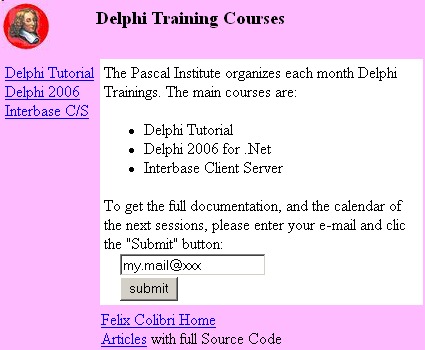
2 - How a RAD HTML generator works Let's assume that we want to generate the following simple .HTML page:
To produce .HTML pages, we must generate an .HTML file with a content similar to:
<HTML>
<BODY>
<FORM method="POST" ACTION="http://127.0.0.1/scripts/training.exe"><BR>
<TABLE width="100%">
<TR >
<TD >
<TABLE width="100%" bgcolor="#FFBBFF">
<TR >
<TD width="22%" valign=top>
<IMG SRC="pascal_institute_2.jpg">
</TD>
<TD >
<H3>Delphi Training Courses</H3>
</TD>
</TR>
</TABLE>
</TD>
</TR>
<TR >
<TD >
<TABLE width="100%" cellpadding=4>
<TR >
<TD width="23%" bgcolor="#FFBBFF" valign=top>
<A HREF="delphi_tutorial">Delphi Tutorial</A><BR>
<A HREF="dellphi_2006">Delphi 2006</A><BR>
<A HREF="interbase_client_server">Interbase C/S</A>
</TD>
<TD bgcolor="#FFFFFF">
The Pascal Institute organizes each month
Delphi Trainings. To get the list of all
available dates:<BR>
<UL>
<LI> Delphi Tutorial
<LI> Delphi 2006 for .Net
<LI> Interbase Client Server<BR>
</UL>
To get the full documentation, and the
calendar of the next sessions, please
enter your e-mail and
clic the "Submit" button:<BR>
<INPUT TYPE="text" NAME="Edit1" VALUE="my.mail@xxx"> <BR>
<INPUT TYPE="submit" NAME="Button1" VALUE="submit"> <BR>
</TD>
</TR>
</TABLE>
</TD>
</TR>
<TR >
<TD >
<TABLE width="100%" bgcolor="#FFBBFF">
<TR >
<TD width="23%" valign=top>
</TD>
<TD >
<A HREF="index">Felix Colibri Home</A><BR>
<A HREF="source_code">Articles</A> with
full Source Code<BR>
</TD>
</TR>
</TABLE>
</TD>
</TR>
</TABLE>
</FORM>
</BODY>
</HTML>
|
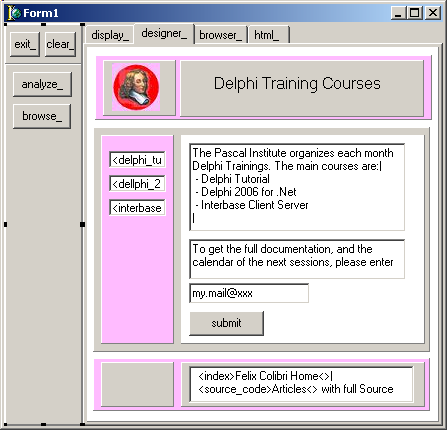
And to do so, we can - create a Delphi tForm, with tPanels used as layout containers:
- analyze the tForm.Controls array to generate the .HTML page
A complete Delphi feasability project transforming a standard tForm with
tPanels used as formating containers into an .HTML page has been presented in the Delphi Web Designer paper.
Instead of using standard tPanel as layout containers, IntraWeb offers many dedicated components, usually descending from the standard Delphi tEdit,
tButton, tCheckBox. And in addition, IntraWeb offers either the complete .HTTP Server (the Application mode) or allows to call the generated pages as ISAPI filters (the Page mode)
3 - Intraweb "Application mode" and "Page mode" IntraWeb contains 2 sets of components: - those used at design time
- those included in the runtime project
The design-time components (Wizards, PROPERTY Editors, Designers) will help us to create the web pages. They are incorporated in the Delphi IDE, and using them will produce UNITs which represents our pages.
The produced pages can - either be sent to the User by using an IntraWeb .HTTP Server
- or used as ISAPI .DLLs, called by Microsoft IIS (Internet Information Server) or the Apache Server
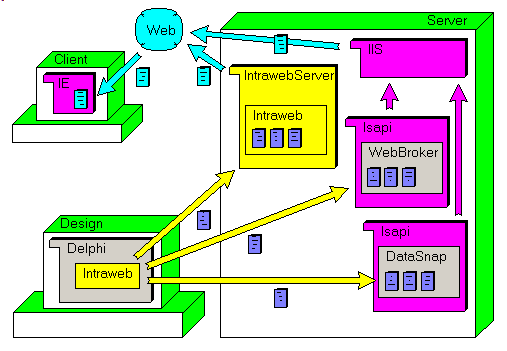
This can be represented by the following figure: where: - the Delphi + IntraWeb framework are used to generate the pages (the deep blue rectangles)
- a runtime, we can use
- either the IntraWeb standalone .HTTP Server
- or any standard Server, like IIS
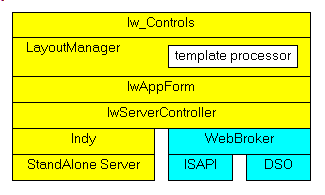
The runtime block diagram looks like this:
On the Client side - the User can load IntraWeb pages from a large variety of Browsers,
including Internet Explorer, Opera etc
- the pages sent to the User include JavaScript code, which is interpreted by the JavaScript interpreter installed on the User PC
- we can also use .XML files to cache some data at the User PC
4 - The Intraweb Class Library 4.1 - The Intraweb CLASSes
We looked at the Intraweb 5.3 classes and, based on the inheritance of each CLASS, we came up with the following organization:
TIWBaseControl= Class(TControl)
TIWControl= Class(TIWBaseControl, IIWControl)
TIWCustomObject= Class(TIWControl)
TIWActiveX= Class(TIWCustomObject)
TIWCustomFlash= Class(TIWCustomObject)
TIWFlash= Class(TIWCustomFlash)
TIWCustomQuickTime= Class(TIWCustomObject)
TIWQuickTime= Class(TIWCustomQuickTime)
TIWMPEG= Class(TIWCustomObject)
TIWApplet= Class(TIWControl)
TIWCSCustomNavigator= Class(TIWControl)
TIWCSNavigator= Class(TIWCSCustomNavigator)
TIWCustomButton= Class(TIWControl)
TIWButton= Class(TIWCustomButton)
TIWCustomCheckBox= Class(TIWControl)
TIWCheckBox= Class(TIWCustomCheckBox)
TIWDBCheckBox= Class(TIWCustomCheckBox)
TIWCustomDynamicChart= Class(TIWControl)
TIWDynamicChart= Class(TIWCustomDynamicChart)
TIWCustomDynamicChartLegend= Class(TIWControl)
TIWDynamicChartLegend= Class(TIWCustomDynamicChartLegend)
TIWCustomDynGrid= Class(TIWControl)
TIWDynGrid= Class(TIWCustomDynGrid)
TIWCustomEdit= Class(TIWControl)
TIWCustomFile= Class(TIWCustomEdit)
TIWDBFile= Class(TIWCustomFile)
TIWFile= Class(TIWCustomFile)
TIWDBEdit= Class(TIWCustomEdit)
TIWEdit= Class(TIWCustomEdit)
TIWCustomGrid= Class(TIWControl)
TIWCalendar= Class(TIWCustomGrid)
TIWDBGrid= Class(TIWCustomGrid)
TIWGrid= Class(TIWCustomGrid)
TIWCustomImage= Class(TIWControl)
TIWDynamicImage= Class(TIWCustomImage)
TIWImage= Class(TIWDynamicImage)
TIWDBImage= Class(TIWDynamicImage)
TIWImageFile= Class(TIWCustomImage)
TIWCustomLabel= Class(TIWControl)
TIWCustomCSLabel= Class(TIWCustomLabel)
TIWCSLabel= Class(TIWCustomCSLabel)
TIWDBLabel= Class(TIWCustomLabel)
TIWLabel= Class(TIWCustomLabel)
TIWCustomListCombo= Class(TIWControl)
TIWCustomComboBox= Class(TIWCustomListCombo)
TIWComboBox= Class(TIWCustomComboBox)
TIWDBComboBox= Class(TIWCustomComboBox)
TIWDBLookupComboBox= Class(TIWCustomComboBox)
TIWCustomListbox= Class(TIWCustomListCombo)
TIWDBListbox= Class(TIWCustomListbox)
TIWDBLookupListBox= Class(TIWCustomListbox)
TIWListbox= Class(TIWCustomListbox)
TIWCustomMemo= Class(TIWControl)
TIWDBMemo= Class(TIWCustomMemo)
TIWMemo= Class(TIWCustomMemo)
TIWCustomRadioGroup= Class(TIWControl)
TIWRadioGroup= Class(TIWCustomRadioGroup)
TIWDBRadioGroup= Class(TIWCustomRadioGroup)
TIWCustomRectangle= Class(TIWControl)
TIWRectangle= Class(TIWCustomRectangle)
TIWCustomText= Class(TIWControl)
TIWDBText= Class(TIWCustomText)
TIWText= Class(TIWCustomText)
TIWDBNavigator= Class(TIWControl)
TIWHRule= Class(TIWControl)
TIWLinkBase= Class(TIWControl)
TIWCustomURL= Class(TIWLinkBase)
TIWURL= Class(TIWCustomURL)
TIWLink= Class(TIWLinkBase)
TIWList= Class(TIWControl)
TIWMenu= Class(TIWControl)
TIWProgressBar= Class(TIWControl)
TIWTimer= Class(TIWControl)
TIWTreeView= Class(TIWControl)
TIWURLWindow= Class(TIWControl)
TIWControlAccess= Class(TIWBaseControl)
TIWContainer= Class(TScrollingWinControl)
TIWModuleDsn= Class(TIWContainer)
TIWBaseForm= Class(TIWModuleDsn)
TIWForm= Class(TIWBaseForm)
TIWAppForm= Class(TIWForm)
TIWShowMessage= Class(TIWAppForm)
TIWPageForm= Class(TIWForm)
TIWRegion= Class(TIWContainer)
===
TIWPaintHandler= Class(TObject)
TIWPaintHandlerDsn= Class(TIWPaintHandler)
TIWPaintHandlerButton= Class(TIWPaintHandlerDsn)
TIWPaintHandlerCheckBox= Class(TIWPaintHandlerDsn)
TIWPaintHandlerComboBox= Class(TIWPaintHandlerDsn)
TIWPaintHandlerComponent= Class(TIWPaintHandlerDsn)
TIWPaintHandlerCSNavigator= Class(TIWPaintHandlerDsn)
TIWPaintHandlerDBNavigator= Class(TIWPaintHandlerDsn)
TIWPaintHandlerEdit= Class(TIWPaintHandlerDsn)
TIWPaintHandlerHRule= Class(TIWPaintHandlerDsn)
TIWPaintHandlerImage= Class(TIWPaintHandlerDsn)
TIWPaintHandlerLabel= Class(TIWPaintHandlerDsn)
TIWPaintHandlerLink= Class(TIWPaintHandlerDsn)
TIWPaintHandlerList= Class(TIWPaintHandlerDsn)
TIWPaintHandlerListBox= Class(TIWPaintHandlerDsn)
TIWPaintHandlerMemo= Class(TIWPaintHandlerDsn)
TIWPaintHandlerProgressBar= Class(TIWPaintHandlerDsn)
TIWPaintHandlerRadioGroup= Class(TIWPaintHandlerDsn)
TIWPaintHandlerRectangle= Class(TIWPaintHandlerDsn)
TIWPaintHandlerText= Class(TIWPaintHandlerDsn)
TIWBase= Class(TObject)
TIWFileParser= Class(TObject)
TIWFormListManager= Class(TObject)
TIWFormPreviewGenerator= Class(TObject)
TIWLicense= Class(TObject)
TIWFileReference= Class(TPersistent)
TIWBackground= Class(TIWFileReference)
TIWGridBorderColors= Class(TPersistent)
TIWDynGridBorderColors= Class(TIWGridBorderColors)
TIWBorderOptions= Class(TPersistent)
TIWDBNavConfirmations= Class(TPersistent)
TIWDBNavImages= Class(TPersistent)
TIWDefaultDynGridCell= Class(TPersistent)
TIWFont= Class(TPersistent)
TIWJpegOptions= Class(TPersistent)
TIWMenuStyle= Class(TPersistent)
TIWURLTarget= Class(TPersistent)
TIWReEntryOptions= Class(TPersistent)
TIWSSLOptions= Class(TPersistent)
TIWTemplateFiles= Class(TPersistent)
TIWTreeViewImages= Class(TPersistent)
TIWLayoutMgrBase= Class(TComponent)
TIWLayoutMgr= Class(TIWLayoutMgrBase)
TIWLayoutMgrForm= Class(TIWLayoutMgr)
TIWLayoutMgrHTML= Class(TIWLayoutMgr, IIWLayoutMgrHTML)
TIWTemplateProcessorHTML= Class(TIWLayoutMgr)
TIWApplication= Class(TComponent)
TIWHTTPServerModule= Class(TComponent)
TIWHTMLManager= Class(TComponent, IDesignNotification, IHTMLLayoutComponent)
TIWStandAloneServer= Class(TComponent)
TIWModuleController= Class(TComponent, IWebDispatch)
TIWClientSideDatasetBase= Class(TComponent)
TIWClientSideDataset= Class(TIWClientSideDatasetBase)
TIWClientSideDatasetDBLink= Class(TIWClientSideDatasetBase)
TIWHTMLElement= Class(TCollectionItem)
TIWHTMLTag= Class(TIWHTMLElement)
TIWHTMLTable= Class(TIWHTMLTag)
TIWTextElement= Class(TIWHTMLElement)
TIWGridCell= Class(TCollectionItem)
TIWCalendarCell= Class(TIWGridCell)
TIWDBGridColumn= Class(TIWGridCell)
TIWColorForm= Class(TForm)
TIWDsnTreeView= Class(TForm, IIWTreeViewDesigner)
TIWServerControllerBase= Class(TDataModule)
TIWPageProducer= Class(TCustomPageProducer)
TIWServer= Class(TCustomWebDispatcher)
TIWSessions= Class(TThreadList)
TIWStream= Class(TStream)
TIWTagParamsStringList= Class(TStringList)
===
TIWCalendarCells= Class(TOwnedCollection)
TIWDBGridColumns= Class(TOwnedCollection)
TIWGridCells= Class(TOwnedCollection)
TIWHTMLTagCollection= Class(TCollection)
TIWObjectParam= Class(TCollectionItem)
TIWObjectParams= Class(TOwnedCollection)
TIWScriptEvents= Class(TOwnedCollection)
TIWScriptEventsItem= Class(TCollectionItem)
TIWTreeViewItem= Class(TCollectionItem)
TIWTreeViewItems= Class(TOwnedCollection)
TIWApplicationWizard= Class(TNotifierObject, IUnknown, IOTARepositoryWizard, IOTAProjectWizard, IOTAWizard)
TIWDataModuleCreator= Class(TNotifierObject, IOTAModuleCreator, IOTACreator)
TIWDataModuleFile= Class(TNotifierObject, IOTAFile)
TIWDataModuleFormFile= Class(TNotifierObject, IOTAFile)
TIWDataModuleHeader= Class(TNotifierObject, IOTAFile)
TIWProjectCreator= Class(TNotifierObject, IOTAProjectCreator50, IOTAProjectCreator, IOTACreator)
TIWProjectFile= Class(TNotifierObject, IOTAFile)
TIWServerControllerCreator= Class(TNotifierObject, IOTAModuleCreator, IOTACreator)
TIWServerControllerFile= Class(TNotifierObject, IOTAFile)
TIWServerControllerFormFile= Class(TNotifierObject, IOTAFile)
TIWServerControllerHeader= Class(TNotifierObject, IOTAFile)
TIWUnitCreator= Class(TNotifierObject, IOTAModuleCreator, IOTACreator)
TIWUnitFile= Class(TNotifierObject, IOTAFile)
TIWUnitFormFile= Class(TNotifierObject, IOTAFile)
TIWUnitHeader= Class(TNotifierObject, IOTAFile)
TIWUnitWizard= Class(TNotifierObject, IUnknown, IOTARepositoryWizard, IOTAProjectWizard, IOTAWizard)
TIWMainUpdateSessions= Class(TIdNotifyMethod)
TIWColorEditor= Class(TColorProperty, ICustomPropertyListDrawing, ICustomPropertyDrawing)
TIWPreviewForm= Class(TDefaultEditor)
TIWImageList= Class(TImageList)
TIWTreeViewComponent= Class(TComponentEditor)
===
TLayoutMgrHTMLComponent= Class(TComponentEditor)
TLayoutMgrHTMLProperty= Class(TPropertyEditor)
TLocalSelection= Class(TDesignerSelections)
TPersistentCracker= Class(TPersistent)
TRC4= Class(TObject)
TSessionTimeoutThread= Class(TThread)
TSWServiceModule= Class(TService)
TSWServiceThread= Class(TThread)
TSyncLog= Class(TIdNotify)
TTreeViewItemsProperty= Class(TPropertyEditor)
TformAppWizard= Class(TForm)
TformFormWizard= Class(TForm)
TFormIWMain= Class(TForm)
TfrmEventsEditor= Class(TForm)
THTMLPaletteItem= Class(TObject)
THTTPFile= Class(TObject)
THTTPFiles= Class(TObjectList)
|
It would have been possible to present those in simplified block diagrams, or in full fledged UML CLASS diagram, but, given the sheer number of those CLASSES, we feel that the resulting huge map would have been difficult to use.
In addition, the Intraweb hierarchy is not very deep.
4.2 - The CLASS Organization The above structure is a pure syntactical construction. It would be more helpful to separate the classes according to where they are used
- at design time only: those CLASSEs are used to integrate IntraWeb to the Delphi IDE. The developer will use them implicitely to build the pages, but they will not be part of the deployed files. In this category, we can place:
- all the Property Editors
- OTA (Open Tool Api) extensions (the CLASSes that help expand the base IDE
- at runtime
- by the IntraWeb Server
- by the WebBroker or DataSnap ISAPI libraries
In addition, to better group the CLASSes, it would be necessary to fully analyze the IntraWeb feature list. For instance, IntraWeb:
- manages sessions
- has access to databases
- manages several .HMTL pages
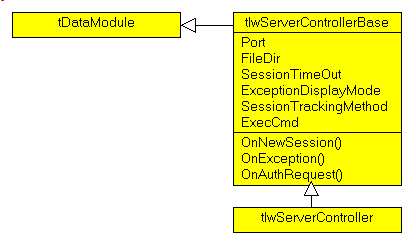
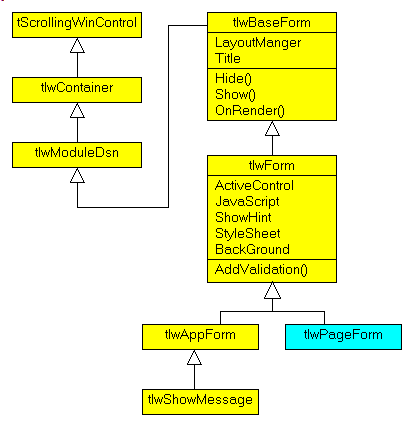
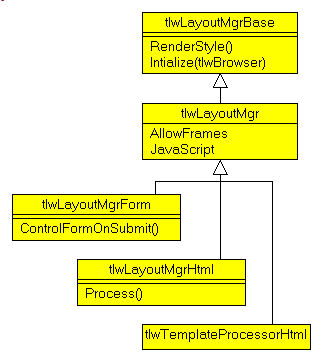
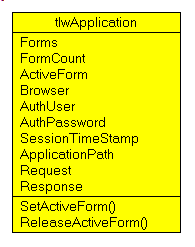
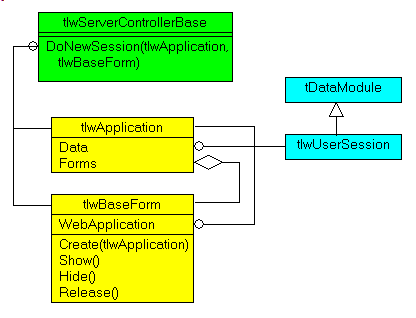
4.3 - Intraweb UML Class Diagram We wrote a 160 K IntraWeb tutorial (referenced by GOOGLE), and therefore had
to dwelve more into the Page mode CLASSes. For the Page mode:
All those CLASS diagram were build by looking into the help, the Object
Inspector and the Delphi 6 IntraWeb .DCUs. It goes without saying that it would have been a lot easier if AToZed (the IntraWeb editor) somehow published the UNIT INTERFACEs.
5 - Building Web Sites with Delphi 5.1 - IntraWeb in perspective There are many other way to build Web sites with Delphi. To name a few: - non-RAD approaches:
- CGI or ISAPI helper libraries (hRef or similar)
- WebBroker and DataSnap, which are part of Delphi
- RAD building tools
- from Developper Express, there is Internet Express Web (IEW)
- on the Microsoft front, there are .ASP and .ASP .NET
- and, of course, IntraWeb
The first Delphi tools available (WebBroker and WebSnap) were non-RAD. Nobody could understand why Borland, who had offered us the Delphi IDE, never
added a true .HTML RAD tool. Well, IntraWeb did the trick, and since Delphi 7, it seems to be one of the most popular tools.
Here are a couple of links with comparisons of the IntraWeb, Developer
Express and Asp.Net approaches, and they contain additional references:
5.2 - Our Site Building Framework Note that we use a different approach to create our pages. First we created our
site before IntraWeb was offered on the Delphi Palette. And, more important, our site mainly contains static text pages with a couple of images. So a text editor is more appropriate than a "control layouter". Therefore:
- we simply write pages with our custom ColiEd editor. This is a simple text editor like Notepad, and writing the text is lightning fast. In addition to the ASCII content that you see, each page also contains
- some markers to incorporate .PNG images
- some simple typographic tags to delimit .HTML links or headers, add bullets or other typographic features like bold italic etc
- the .ED file is placed in the appropriate folder. The disc organization exactly mirrors the hierarchical site path organization
- we then use a Delphi project, SiteEditor to transform each .ED editor file into an .HTML file.
The generator then adds the purple outer region which contains: - the top location link (where you are in the page tree)
- the left-side indented menu
- the bottom addresses
And navigation links between pages are built according to the disk pathes
6 - Your Comments As usual:
- please tell us at fcolibri@felix-colibri.com if you found some errors, mistakes, bugs, broken links or had some problem downloading the file. Resulting corrections will
be helpful for other readers
- we welcome any comment, criticism, enhancement, other sources or reference suggestion. Just send an e-mail to fcolibri@felix-colibri.com.
- or more simply, enter your (anonymous or with your e-mail if you want an answer) comments below and clic the "send" button
- and if you liked this article, talk about this site to your fellow developpers, add a link to your links page ou mention our articles in your blog or newsgroup posts when relevant. That's the way we operate:
the more traffic and Google references we get, the more articles we will write.
7 - Intraweb Home Page IntraWeb was originally designed by Chad Z. HOWER, alias KUDZU, back in 1996/97, and was then called Portcullis/IAG. Chad was the creator of Winshoes, later renamed Indy, which is the actual Socket and TCP/IP Protocol component suite implementation for Delphi. This explains why IntraWeb includes a full featured .HTTP Server, even
including the very nice SSL layer. The current version of IntraWeb is maintained by a developer team at Atozed Software. Chad is no longer actively involved with IntraWeb's further
development. He is still an end user of IntraWeb and gives input to the development team. We also wish to thank all of those who corrected our first presentation of this Intraweb history.
The IntraWeb product as such is available since Delphi 7. The 5.3 version is also backward compatible with Delphi 6. With Delphi 2006 Architect, we had
the version 8. We usually do not perform third product overview, but since this once came with Delphi ... The above CLASS list was analyzed on the 5.3 free trial version. This is
mainly because we have a Delphi 6 .DCU analyzer, and analyzing the IntraWeb version which comes with Delphi 2006 would require the upgrade of our .DCU analyzer to handle those binaries.
You will find more information, as well as demo versions (not time limited, but some features are not available) and the full version at:
8 - The author Felix John COLIBRI works at the Pascal Institute. Starting with Pascal in 1979, he then became involved with Object
Oriented Programming, Delphi, Sql, Tcp/Ip, Html, UML. Currently, he is mainly active in the area of custom software
development (new projects, maintenance, audits, BDE migration, Delphi Xe_n migrations, refactoring), Delphi Consulting and Delph training. His web site features tutorials, technical papers about programming with full downloadable source
code, and the description and calendar of forthcoming Delphi, FireBird, Tcp/IP, Web Services, OOP / UML, Design Patterns, Unit Testing training sessions.
|